WinterizeGuide.com went live in the fall of 2023, which, if you were paying attention to search marketing at the time, was a bit like opening a Blockbuster loyalty program the same month Netflix mailed out its millionth DVD. Google rolled out its March 2023 Core Update right as I finished building the site, and the algorithm looked at my brand-new “authority site” about winterizing pool pumps and pond fountains with all the enthusiasm of a bouncer checking IDs at a bar that had just been raided. It gets a trickle of traffic. It has never once been mistaken for an authority on anything. For years now, its only real job has been to sit there quietly so I have somewhere low-stakes to poke at WordPress without touching a client’s site.
Which made it the perfect victim for what I did to it a few weeks ago.
I’d been watching a podcast episode, the way you do at 11pm when you’ve told yourself you’re winding down and instead you’re taking notes, where a guy named Vinny was explaining something called WebMCP to Greg Isenberg. The pitch, boiled down: Google and Microsoft built a way for a website to hand an AI agent a clean little menu of things it’s allowed to do, “here’s how to search,” “here’s how to book,” “here’s how to buy,” instead of making the agent squint at your HTML like a substitute teacher trying to read a kid’s handwriting. Vinny had built a demo espresso shop where an agent compared machines, checked if a grinder fit the counter, and added things to a cart, all by talking to the page directly. Genuinely cool, and I say that as someone whose day job involves staring at HubSpot workflows.
It was also, Vinny was very clear, extremely early. Experimental. Behind a Chrome flag. The kind of thing where half of Twitter says “why bother, it’s not ready,” and the other half is quietly building during the exact window nobody else is looking. I know which side I wanted to be on. I did not, however, want to be on it with a website anyone actually cares about. Enter the site Google’s algorithm already decided nobody cares about. Wint Guide? Meet WebMCP.
The part where Google’s own documentation is wrong
The first speed bump had nothing to do with WordPress. Every blog post, every tutorial, half the internet’s collective understanding of this feature pointed toward navigator.modelContext as the thing you check in the browser console to see if any of this is working. So we checked it. Undefined. We checked it again, slower, like that would help. Still undefined. I had Claude confirm the Chrome flag was actually on, which it was, buried in a base64 command-line string, a genuinely unhinged place to have to go looking.
The real answer turned out to be document.modelContext. Not navigator. Document. One word away from where every “definitive guide” currently ranking for this topic told me to look. There’s a specific satisfaction in confirming that people writing confident tutorials about bleeding-edge browser features are also just guessing.
Teaching a search box to introduce itself
I can read HTML and CSS well enough to find my way around a page and nudge a line here or there, the way I can read a restaurant menu in Spanish, enough to order with confidence, not enough to write the menu myself. Building something from scratch is a different skill, so this part was Claude’s job: wiring up WinterizeGuide’s existing search form (it runs on the Genesis Framework) with three attributes, toolname, tooldescription, and toolparamdescription, through a free plugin called Code Snippets rather than touching the live theme files directly. I’ve made that mistake before, and my hosting provider’s support chat does not need to hear from me again this month.
Here’s the part that made me laugh out loud at my desk. Right after adding those attributes, we checked whether the browser had noticed the new tool, and it hadn’t; the list came back empty. Reasonably, we assumed the declarative approach wasn’t working, so I had Claude build a second version by hand, actual JavaScript registering the same tool imperatively. It worked. We reloaded the page to admire the handiwork, and Chrome informed us we now had a duplicate tool name error, because the first version had been working the entire time, just on a delay, and now two mechanisms were fighting over the same search box like a Thanksgiving table argument over who invited Uncle Gary. We turned off the one built out of a false sense of urgency. The original had been fine all along.
The part where it learned manners, then unlearned them
Before bringing in a real AI, we, (Claude and I) ran the tool by hand, filling in a search term the way a script would. The field populated. Nothing else happened; it just sat there, filled in, patiently waiting, like a form your kid fills out for you and then hands over so you can be the one to hit submit. That’s the default, and it’s a good one: an agent can prep the action, but a human has to pull the trigger.
There’s also an attribute called toolautosubmit that turns this off entirely. We tested it. Works exactly as advertised, meaning exactly as concerning as advertised; add it, and the same tool call skips the human step and submits the real form, no confirmation, no pause. For a plain search, low stakes, who cares. For a booking form or a quote request with a name and phone number attached, that’s a conversation to have with a client on purpose, not a default to fall into because the checkbox exists.
Google’s own testing tool doesn’t actually work
Before roping in a real AI, I went looking for the easy path. Google conveniently provides one: a hosted tool where you paste in any website’s URL, type a plain English request, and watch an AI figure out what to do. We pointed it at WinterizeGuide. Zero tools available. Not “loading,” not “not found,” a flat zero, every time.
So we did what any reasonable person does when a vendor’s own demo tool doesn’t work: assumed we’d broken something, then spent an embarrassing amount of time confirming we hadn’t. Permissions were configured correctly. Google’s own bundled example site, loaded into the same tool, found seven tools instantly. The difference wasn’t my site; it’s that letting an embedded, third-party website hand its tools up to a parent page isn’t actually built into Chrome yet. It’s an open proposal, sitting in a GitHub issue filed last November, still unresolved. Google shipped a spec, then shipped an official tool for testing that spec, and the tool can’t test it on any site except the ones already bundled inside it. There’s a specific flavor of irony in a company building the on-ramp before finishing the road.
The workaround was simpler than the diagnosis: instead of embedding WinterizeGuide inside someone else’s tool, we made WinterizeGuide the actual page the agent stood on. Claude wrote a few lines of JavaScript, run directly in the browser, that pulled the search tool’s schema and handed it to Gemini along with a plain English request.
The moment that actually mattered
Here’s what we asked for: “Search this site for information about gutters.” That’s it. Nobody told it the search box’s parameter was named s, a detail so unintuitive I only knew it myself from digging through raw HTML earlier. Nobody told it which tool to call or how to format the request. Just a sentence a person would actually say.
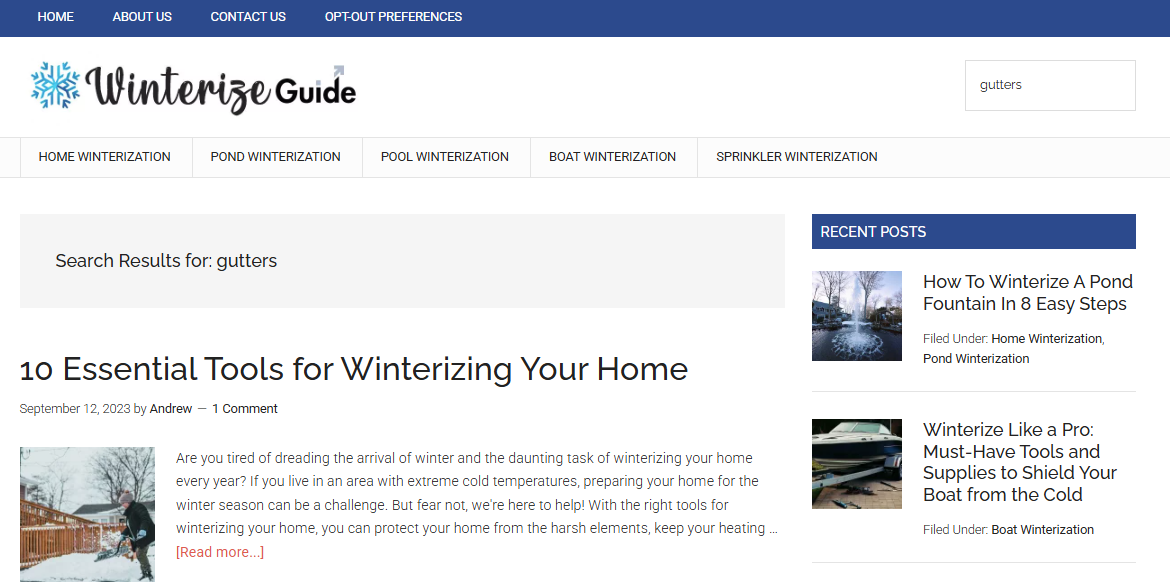
Gemini looked at the tool’s description and its schema, and correctly called search_site with the parameter s set to “gutters.” First try. It filled the real search box on the real, live, still-not-an-authority-on-anything website, then stopped, waiting for a human, the exact same well-mannered pause from the test above. I took a screenshot before touching anything, because I’ve learned, more than once in this exact project, to document the moment before poking at it further.
Then, because the pause is the whole point, I did what it’s there for. I hit Enter. WinterizeGuide.com pulled up a real page of real search results about gutters, from a request that started as a sentence and ended as a working query, with a machine in the middle that had never seen this website before that afternoon.
What’s next
WinterizeGuide proved the mechanism works: a real AI, given nothing but a schema and a plain sentence, can find and correctly use a tool on a website it’s never seen before. What it didn’t prove is whether this can be built from scratch, on a site that doesn’t already have the thing I’m trying to expose.
That’s the next test, running on my personal site, AndrewGrosman.com, which currently handles “someone wants to contact me” with a mailto link, a piece of internet infrastructure so quaint it’s basically a “for a good time, call” written in Sharpie on a bathroom stall door. There’s no form to teach manners to yet, just a phone number and a prayer. I’ll let you know when the site graduates from stall wall to an actual conversation.
[…] few weeks ago I ended a blog post by comparing my personal website’s contact page to a phone number written in Sharpie on a […]