A few weeks ago I ended a blog post by comparing my personal website’s contact page to a phone number written in Sharpie on a bathroom stall door, and promised to let you know when it graduated to an actual conversation. This is that update.
The stall wall was a mailto link: my name, New Berlin, WI, and a clickable email address that launched whatever mail program your computer believes you use, which for most people is an app they last opened during the Windows Vista era.
winterizeguide.com proved an AI could find and use a tool on a website that already had one. The harder question, and the one that matters if I ever want to do this for someone else, was whether I could build one from nothing: a real form, set up for AI agents from day one.
Building a front door from scratch
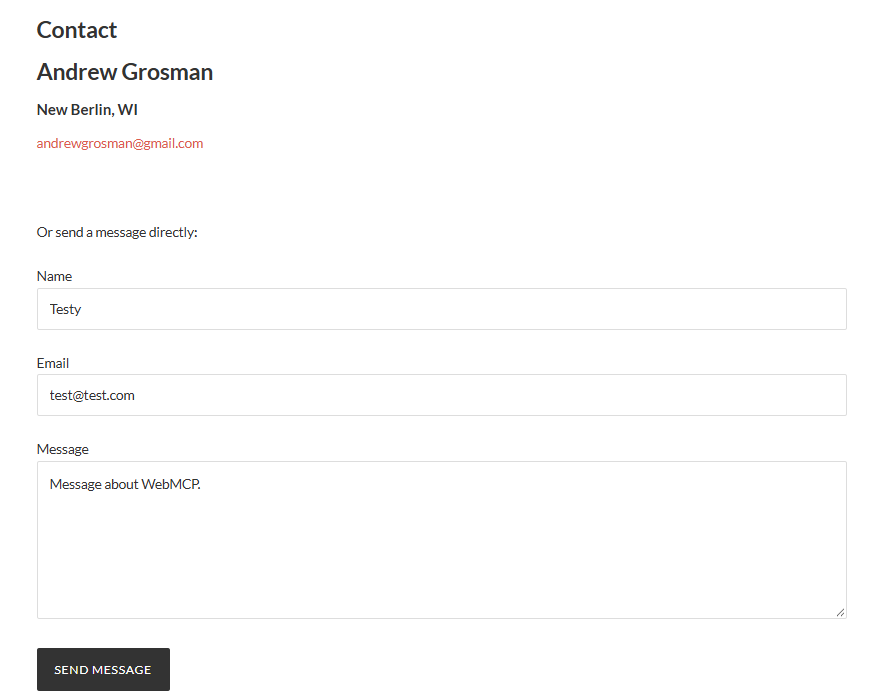
WinterizeGuide’s search box already existed, so all we did there was add three attributes to it. AndrewGrosman.com had nothing to add them to. Claude wrote the whole form as a WordPress shortcode, [ag_contact_form], that does three jobs: it draws the form, it includes the WebMCP attributes right in the markup, and it handles the submission on the server, sending it to my inbox with wp_mail(). Name, email, message, a security check, and a clear error if you leave something blank.
It runs through Code Snippets, the same free plugin I used on WinterizeGuide, which it turned out wasn’t installed on AndrewGrosman.com. Plugins don’t follow you between sites, so installing it was step one.
One practical lesson from the build: the first attempt to get the code into the plugin’s editor typed it in one keystroke at a time, and the editor’s auto-close feature doubled every bracket and quote, which left the PHP broken. The fix was to skip typing and set the editor’s contents directly through its own JavaScript. If you’re putting code into a browser-based editor, that’s the reliable way to do it.
The part where Chrome moved the furniture
On WinterizeGuide, checking whether the browser had noticed a tool took one line in the console. Once the new form was live, I ran the same line and got back {}. No error, no warning, just an empty result.
So we checked WinterizeGuide, the site that had worked a few weeks earlier. Also {}. That ruled out anything specific to the new form.
What had changed was Chrome. Somewhere between September 2 and September 28, the function that lists a page’s tools started returning a promise instead of an answer. If your code doesn’t wait for it, and mine didn’t, converting it to text gives you {} with no complaint. Adding await brought every tool back.
That fixed the list, but running the tool still did nothing: no fill, no error, just pending. Adding a timeout finally surfaced an error. Chrome now rejects the input format I used on September 2 and wants a plain JavaScript object instead of a string. Same information, different format, and no announcement that I could find.
I’m spelling this out because anyone reusing tutorial code from even a month ago will hit the same two walls, and the natural conclusion from {} is that WebMCP stopped working. It didn’t. It’s an experimental feature behind a flag, and the way you call it changed.
The AI that asked first
Then the real test, same setup as WinterizeGuide: Claude pulled the form’s tool description from the live page and handed it to Gemini along with a plain-English request to send me a message.
Gemini didn’t send anything. It asked for confirmation first.
That wasn’t a browser default. The form’s tool description (the part written for the AI rather than for people) says in plain words that this form sends a real email and the agent should confirm with the user before submitting. Gemini read that and followed it. On WinterizeGuide, the pause came from the browser, which fills a form but won’t submit it unless told to. This time the pause came from the model itself, before it touched the form.
There was also a choice on my end. WebMCP has a setting that lets an agent submit a form with no human in the loop, and I tested it on WinterizeGuide’s search box, where the worst case is a page of search results you didn’t ask for. This form collects a name, an email address, and whatever someone wants to tell me, so it stays off. An agent can fill it in; a person has to send it.
Once that confirmation was given, Gemini returned the actual tool call, and when Claude ran it, all three fields on my live Contact page filled in exactly as Gemini had written them. The Send Message button sat there unclicked, the same pause as the WinterizeGuide search box.
Pressing send
With my go-ahead, the button got clicked. The form’s confirmation appeared (“Thanks, your message has been sent. I’ll get back to you soon.”), and the email landed in my Gmail inbox: a plain-English sentence in, a real email out, through a model that had never seen my website before.
Now the honest part. None of this happened on its own; we built the bridge, a few lines of JavaScript that handed the page’s tools to Gemini. When I started writing this post, every writeup I could find said no mainstream AI assistant used these tools by itself yet. Then, while I was fact-checking that exact sentence, it stopped being true: ChatGPT’s desktop app had started using them, with one catch that mattered for my form. That’s a story of its own, and it’s the next post.
But the front door is built. It has a handle an AI can find, and a sign on it that says knock first. For a page that a month ago was a phone number in Sharpie, I’ll take it. The stall wall has been repainted, and somebody even left a nice message on it.
[…] The last post ended with a promise that this one would be about something new, and the reason is a single sentence I tried to fact-check. The sentence said no mainstream AI assistant used WebMCP tools on its own yet. Every article I’d read said so, and I’d repeated it like a guy at a cookout confidently explaining that you can’t get a sunburn when it’s cloudy. […]